CAD(3d 変換) - メーカー・企業と製品の一覧 | イプロス

更新日: 集計期間:Feb 18, 2026~Mar 17, 2026
※当サイトの各ページの閲覧回数を元に算出したランキングです。

CADの製品一覧

1~29 件を表示 / 全 29 件

表示件数

Direct Feature-Based CAD "CADPAC-NT 3D"

Creating the future with original and innovative products, Direct Feature-Based CAD.

CADPAC-NT 3D allows you to directly specify the areas you want to edit without constraints or work history, enabling edits and deletions according to the designer's intent. It also features the ability to freely change the model shape by modifying dimension values entered after modeling, as well as intuitive and dynamic deformation capabilities. This product comes with various converters that can directly read and export raw data created in other 3D CAD systems. With these powerful data conversion functions, it is possible to expand into various applications, including CAM, 3D printing, analysis software, and the comparison and verification of 3D to 2D drawings.

  • Drawing, tracing, CAD
  • Other CAD
  • CAD

ブックマークに追加いたしました

ブックマーク一覧

ブックマークを削除いたしました

ブックマーク一覧

これ以上ブックマークできません

会員登録すると、ブックマークできる件数が増えて、ラベルをつけて整理することもできます

無料会員登録

2D3D Integrated CAD CADPAC-CREATOR [Free Trial Version]

You can use the trial version of CADPAC-CREATOR for free.

CADPAC-CREATOR is the latest 2D/3D hybrid CAD that combines the highly rated 2D CAD in the manufacturing sector with powerful data exchange and direct editing features of a new sensation 3D CAD. With CADPAC-CREATOR, you can experience its excellent operability and data compatibility through a free trial version.

  • Drawing, tracing, CAD
  • CAD

ブックマークに追加いたしました

ブックマーク一覧

ブックマークを削除いたしました

ブックマーク一覧

これ以上ブックマークできません

会員登録すると、ブックマークできる件数が増えて、ラベルをつけて整理することもできます

無料会員登録

2D3D Integrated Design CAD 'CADPAC-CREATOR'

Free-form modeling: New freestyle 2D/3D CAD

CADPAC-CREATOR is the latest 2D-3D integrated CAD that combines a high-performance and user-friendly 2D CAD with a new sensation 3D CAD function that allows users to freely generate and edit shapes without being bothered by constraints, history, or features, while reading various shape data. Additionally, it is equipped with interfaces for three-dimensional measurement, CAM, and processing equipment, enabling creative manufacturing based on innovative ideas from design to production.

ブックマークに追加いたしました

ブックマーク一覧

ブックマークを削除いたしました

ブックマーク一覧

これ以上ブックマークできません

会員登録すると、ブックマークできる件数が増えて、ラベルをつけて整理することもできます

無料会員登録

High-spec 3D viewer "3DTascalX"

This is a 3D viewer that adopts the same kernel as 3D CAD, achieving high functionality and low cost, positioned as "more than a viewer but less than CAD."

High-quality data conversion that enables various 3D CAD data input and output, high-precision measurement that can be used for processing and inspection utilizing auxiliary coordinates, easy 2D drawing generation from 3D, and the ability to verify a wide range of secondary usable data such as design change locations, heights, slopes, holes, undercuts color-coded, projected areas, cross-sections, surface areas, and mass. By utilizing this in various manufacturing processes such as sales estimation, drawing inspection, construction method consideration, data conversion, processing drawings, inspection, and assembly instructions, it promotes the effective use of your company's three-dimensional data. 【Features】 - A wide range of supported data including CATIA V4, V5, NX, Creo, SolidWorks, JT, Parasolid, IGES, STEP, ACIS, Cfio, Inventor, 3D PDF, etc. - Dedicated functionality for batch processing data conversion - High-precision measurement with an accuracy of up to 1/10,000,000 - Approximate circular arc interpolation for ellipses and splines - Visual verification made easy by color-coding design change locations, heights, slopes, holes, undercuts, etc. - Ability to share a lot of information with minimal licensing using a free viewer.

ブックマークに追加いたしました

ブックマーク一覧

ブックマークを削除いたしました

ブックマーク一覧

これ以上ブックマークできません

会員登録すると、ブックマークできる件数が増えて、ラベルをつけて整理することもできます

無料会員登録

Free trial version download!! 3D viewer 3DTascalX

A 3D viewer that achieves high functionality and low cost, positioned as 'more than a viewer but less than CAD.'

First, download the free trial version from the link below!! http://www.3dtascal.com/products/trial.html#3dt_trial By utilizing it in various processes of manufacturing such as sales estimates, inspection, construction method examination, data conversion, processing drawings, inspection, and assembly instructions, you can promote the effective use of your company's 3D data. 【Features】 - A wide range of supported data including CATIA V4, V5, NX, Creo, SolidWorks, JT, Parasolid, IGES, STEP, ACIS, Cfio, Inventor, 3DPDF, etc. - Dedicated functionality for batch processing data conversion - High precision measurement up to 1/10,000,000 order - Approximate circular arc interpolation for ellipses and splines - By color-coding design change areas, heights, slopes, holes, undercuts, etc., it can be visually verified in an easily understandable manner - Using a free viewer, it is possible to share a lot of information with the minimum necessary licenses.

ブックマークに追加いたしました

ブックマーク一覧

ブックマークを削除いたしました

ブックマーク一覧

これ以上ブックマークできません

会員登録すると、ブックマークできる件数が増えて、ラベルをつけて整理することもできます

無料会員登録

3D CAD "KEYCREATOR"

Fusion of 3D functionality and 2D drawing capabilities! Comprehensive support for the design trial-and-error process.

"KEYCREATOR" is a system that allows anyone to easily create 3D models with the feeling of drawing three-view drawings in 2D design. By avoiding careless mistakes during 2D design, it achieves a reduction in design time. By effectively utilizing existing 2D data, it eliminates the hassle of re-entering shapes while viewing 2D drawings, and thanks to interfaces with various 3D CAD systems, smooth work can be done without data compatibility issues through intermediate files. [Features] ■ Direct editing is possible even with data converted from other CAD systems. ■ 2D drawings, 3D wires, surfaces, and solids can all be used together in the same space. ■ Direct shape changes can be made simply by changing the dimension numbers. *For more details, please refer to the PDF materials or feel free to contact us.

ブックマークに追加いたしました

ブックマーク一覧

ブックマークを削除いたしました

ブックマーク一覧

これ以上ブックマークできません

会員登録すると、ブックマークできる件数が増えて、ラベルをつけて整理することもできます

無料会員登録

Free trial available! In any case, it's cheap! Simple 3D viewer 3DFovi.

A simple 3D viewer that achieves an overwhelming low price of 46,200 yen, making it easy for beginners.

"3DFovi" is a 3D viewer that emphasizes "simplicity," achieving overwhelming low prices and easy operation. It can display major 3D CAD data such as CATIA V5, NX, Creo (formerly Pro/ENGINEER), SolidWorks, as well as 2D CAD data like DXF and DWG, and allows for simple measurements. Even users who already have a 3D viewer can reduce data conversion, management workload, and running costs due to the wide variety of supported data and low price. 【Features】 ■ Directly reads various data formats ■ Simple and easy-to-use functions for anyone 【Main Functions】 ■ Display, cross-section, split display ■ Measurement, volume, maximum outline calculation, numbering, comments, coloring The latest version also supports STL and VRML output. ★ A 30-day free trial version can be downloaded from the following link: https://www.3dtascal.com/products/trial.html

  • Scientific Calculation and Simulation Software
  • others
  • CAD

ブックマークに追加いたしました

ブックマーク一覧

ブックマークを削除いたしました

ブックマーク一覧

これ以上ブックマークできません

会員登録すると、ブックマークできる件数が増えて、ラベルをつけて整理することもできます

無料会員登録

3D CAD "CADPAC-NT 3D" Recommended Operating Model

3D conversion using 2D data is possible! It reduces the time for inspection and corrections due to design errors.

"CADPAC-NT 3D" is a very easy-to-use 3D CAD that allows users with 2D design experience to model with the same feel as before. It displays 2D and 3D operations simultaneously, enabling 3D modeling while drawing in 2D. Additionally, various converters are available to directly import and export raw data created in other 3D CAD software. Our company offers the recommended models 'Be-Clia Type-T11RIS75/Be-Clia Type-T11RIS76/CERVO Grasta Type-IS2WR-Q-IS77'. 【Features of CADPAC-NT 3D】 ■ Simple operation that can be used with the feel of 2D design ■ Powerful data conversion with commercially available 3D CAD ■ Direct editing with intuitive operation ■ Significant reduction in design time ■ Effective use of 2D data and collaboration with 3D ■ Functionality for modifying, creating tables, and outputting part information linked with the CAD database ■ CAD SHOP collaborative model ■ DESIGN CREATION collaborative model *For more details, please refer to the related links or feel free to contact us.

  • Drawing, tracing, CAD
  • CAD

ブックマークに追加いたしました

ブックマーク一覧

ブックマークを削除いたしました

ブックマーク一覧

これ以上ブックマークできません

会員登録すると、ブックマークできる件数が増えて、ラベルをつけて整理することもできます

無料会員登録

The estimated man-hours for plastic molded products have been halved! An easy-to-implement 3D viewer.

Are you struggling with the time and price negotiations for creating estimates? A 3D viewer that anyone from the design department to the sales department can easily operate is available at a low price! *Free trial available.

Do you have any of these problems? ■ Most people outside the design department do not know how to handle 3D CAD... ■ Creating estimates requires gathering information from various departments, which takes time... ■ It is difficult to accurately calculate weight and pricing based solely on 2D drawings... ■ In the case of complex shapes, it is hard to see the structure and details of the product... and more. The '3DFovi' handled by C-Set allows users with a 3D viewer to reduce the workload and running costs associated with data conversion and management due to the abundance and low cost of the data. If you are considering switching from 3D CAD or from 2D to 3D drawings, why not try our free trial version? ★ If you are interested, please enter 'Request for trial version' in the inquiry button. *For information on implementation effects, please download the PDF.

  • Scientific Calculation and Simulation Software
  • others
  • CAD

ブックマークに追加いたしました

ブックマーク一覧

ブックマークを削除いたしました

ブックマーク一覧

これ以上ブックマークできません

会員登録すると、ブックマークできる件数が増えて、ラベルをつけて整理することもできます

無料会員登録

Lighting Simulator CAD Rhinoceros Compatible Version

We will enhance integration with the 3D modeling software "Rhinoceros 5" to seamlessly utilize model data and improve the efficiency of analysis work.

The "Lighting Simulator CAD Rhinoceros Compatible Version" is a purely domestic simulation software "Lighting Simulator CAD" that is optimal for performance evaluation of the latest various lighting devices using LEDs and other technologies. It maintains the easy operability and high calculation accuracy while enhancing collaboration with the 3D modeling software "Rhinoceros 5." By seamlessly utilizing model data, it aims to shorten analysis work and further improve the efficiency of the development process.

  • System lighting and lighting control
  • Floodlight
  • Street lights
  • CAD

ブックマークに追加いたしました

ブックマーク一覧

ブックマークを削除いたしました

ブックマーク一覧

これ以上ブックマークできません

会員登録すると、ブックマークできる件数が増えて、ラベルをつけて整理することもできます

無料会員登録

Lighting Simulator CAD Rhino-compatible version

Lighting analysis is possible on "Rhinoceros"! Designers can perform optical analysis, improving work efficiency.

The "Lighting Simulator CAD Rhinoceros Compatible Version" is a purely domestic simulation software "Lighting Simulator CAD" that is optimal for performance evaluation of various modern lighting devices using LEDs and other technologies. It maintains the easy operability and high calculation accuracy while enhancing collaboration with the 3D modeling software "Rhinoceros." By seamlessly utilizing model data, it aims to shorten analysis work and further improve the efficiency of the development process.

  • 企業:Camerium
  • 価格:500,000 yen-1 million yen
  • Scientific Calculation and Simulation Software
  • Architectural CAD
  • Downlight
  • CAD

ブックマークに追加いたしました

ブックマーク一覧

ブックマークを削除いたしました

ブックマーク一覧

これ以上ブックマークできません

会員登録すると、ブックマークできる件数が増えて、ラベルをつけて整理することもできます

無料会員登録

CADSoftTools

Developing various software such as "ABViewer" and "CST CAD Navigator"!

CADSoftTools is a software development company that supports numerous 2D and 3D formats such as AutoCAD DWG, DXF, HPGL (PLT), SVG, and CGM. The 2D and 3D file viewer "ABViewer" allows you to view files and obtain dimensions, create and edit 2D files, convert PDF files to editable DWG/DXF, generate G-code for CNC machines, and export to other formats. We also offer a variety of other products. Please feel free to contact us if you have any requests. 【Products (partial)】 ■ABViewer ■CST CAD Navigator ■CADEditorX ■infoCAD .NET ■infoCAD VCL Multiplatform *For more details, please refer to the related links or feel free to contact us.

  • 企業:B7
  • 価格:Other
  • Other CAD
  • CAD

ブックマークに追加いたしました

ブックマーク一覧

ブックマークを削除いたしました

ブックマーク一覧

これ以上ブックマークできません

会員登録すると、ブックマークできる件数が増えて、ラベルをつけて整理することもできます

無料会員登録

Design Creation Inc. Company Profile

Making IT a tool for 'monozukuri' that anyone can use.

Design Creation Co., Ltd. continues to develop all the necessary functions for future "manufacturing," from CAD/CAM to internet collaboration, aiming to make IT a tool for "manufacturing" that anyone can use. We will provide ongoing support for effective utilization and engage in activities to become a new force that opens the 21st century. 【Business Description】 ■ Development, sales, and support of CAD and knowledge information database software *For more details, please refer to our catalog or feel free to contact us.

  • Drawing, tracing, CAD
  • CAD

ブックマークに追加いたしました

ブックマーク一覧

ブックマークを削除いたしました

ブックマーク一覧

これ以上ブックマークできません

会員登録すると、ブックマークできる件数が増えて、ラベルをつけて整理することもできます

無料会員登録

Mastercam Multi-Axis Machining Option

This is a 3D CAD/CAM system, ranked No. 1 in the world for installation achievements, that uses visuals extensively in the settings screen, making it easy to understand and simple to set up multi-axis machining.

The settings screen makes extensive use of visuals, allowing for easy creation of complex multi-axis tool paths. In particular, it is well-known for its rich axis settings, enabling thorough detailing of movements. The output NC data is compatible with various manufacturers' models and control panels of machine tools.

ブックマークに追加いたしました

ブックマーク一覧

ブックマークを削除いたしました

ブックマーク一覧

これ以上ブックマークできません

会員登録すると、ブックマークできる件数が増えて、ラベルをつけて整理することもできます

無料会員登録

Building Equipment Dedicated CAD "CADWe’ll Tfas 14"

Drawing the future... Dedicated features with advanced facilities maximize business performance.

CADWe'll Tfas 14 is a dedicated CAD for architectural equipment that combines intuitive and easy-to-understand operability with high expressiveness that conveys the designer's intent. Thanks to the latest graphic technology, it enables high-speed and high-definition 3D representation, including 3D display, viewpoint movement, contours, and text, allowing for optimal performance in scenes of consensus building with clients, such as interference checks with components and equipment and complex routing. Furthermore, in addition to advanced drawing functions, it is equipped with a wealth of dedicated features that support BIM, strongly enhancing operational efficiency in all scenarios from design drawings and construction drawings to quantity takeoffs. 【Feature 1】 Realization of high-speed 3D display, high-speed viewpoint movement, high-definition display, and texture display 【Feature 2】 Large-scale projects and large-capacity drawings can be easily handled thanks to advanced memory management 【Feature 3】 Practical technical calculation functions 【Feature 4】 Floor management through sheets and BIM model compatibility 【Feature 5】 BIM collaboration through high-precision data compatibility            Interoperability with AutodeskⓇ RevitⓇ

  • CAD for building facilities
  • CAD

ブックマークに追加いたしました

ブックマーク一覧

ブックマークを削除いたしました

ブックマーク一覧

これ以上ブックマークできません

会員登録すると、ブックマークできる件数が増えて、ラベルをつけて整理することもできます

無料会員登録

dwg-compatible CAD 'BricsCAD V25'

The .dwg one platform of "BricsCAD" that realizes a simple design flow.

Our company offers the DWG-compatible CAD 'BricsCAD V25', which can handle 2D-3D-BIM design within a single application. You can achieve cost reduction and improved operational efficiency with a smooth and simple design flow, without the hassle of purchasing and managing multiple types of CAD software, learning CAD operations, or dealing with data conversion issues and accuracy. Additionally, for 2D designers, it is recommended for "first-time 3D and BIM" as they can start 3D and BIM design with the same operability. **Reasons to Choose 'BricsCAD'** - **High Compatibility**: Highly compatible with AutoCAD, making migration easy. - **Flexible Licensing**: Affordable perpetual licenses available, with the option to purchase a network version outright. - **Application Integration**: Industry-specific applications enhance operational and drafting efficiency. *Please note that we are a sales agent. For more details, please download the PDF or feel free to contact us.*

ブックマークに追加いたしました

ブックマーク一覧

ブックマークを削除いたしました

ブックマーク一覧

これ以上ブックマークできません

会員登録すると、ブックマークできる件数が増えて、ラベルをつけて整理することもできます

無料会員登録

BIM-compatible architectural design 3D CAD "Autodesk Revit"

Architectural design, MEP engineering, structural engineering, BIM-compatible 3D CAD for construction execution.

Autodesk Revit is a 3D architectural CAD that supports BIM (Building Information Modeling). It features parametric modeling that accurately expresses design intent using basic parts and detailed assemblies. It includes a work-sharing function that allows multiple members to work simultaneously on a centrally managed model. Additionally, it has an automatic update function that reflects changes made in one location throughout the entire Revit model, enabling efficient design and construction within a single software. We offer subscriptions and maintenance plans for "Autodesk Revit." Please feel free to contact us if you are considering implementing Autodesk Revit.

  • Drawing, tracing, CAD
  • Architectural CAD
  • Other Software
  • CAD

ブックマークに追加いたしました

ブックマーク一覧

ブックマークを削除いたしました

ブックマーク一覧

これ以上ブックマークできません

会員登録すると、ブックマークできる件数が増えて、ラベルをつけて整理することもできます

無料会員登録

Domestic 2D CAD "CADSUPER 2023"

Excellent data compatibility that serves as the core of the drawing environment! Achieving drawings that meet the demands of professional designers.

"CADSUPER 2023" is a domestically produced 2D CAD with excellent drafting capabilities. It offers intuitive commands and usability that eliminate confusion during drawing, allowing for the creation of a design environment tailored to the designer's needs. It fulfills the drafting requirements of professional designers for conceptual design, parts design, large assembly drawings, and detailed parts drawings. Additionally, it features functionality to utilize 3D data and project it into projection drawings. Our product includes a unique correction function for obtaining projection drawings, resolving issues that arise during the creation of projection drawings. 【Recommended for those with the following concerns】 ■ I want to introduce an easy-to-use 2D CAD for anyone. ■ I want to implement a customizable 2D CAD. ■ I want to use a 2D CAD that can read various data formats. 【Features】 ■ Excellent data compatibility that serves as the core of the drafting environment. ■ Quickly create drawings using group shape functions and standard parts mechanical element functions. ■ Equipped with functionality to utilize 3D data and project it into projection drawings. ■ Quickly finish drawings even with data converted from other 2D CADs. *For more details, please refer to the PDF materials or feel free to contact us.

ブックマークに追加いたしました

ブックマーク一覧

ブックマークを削除いたしました

ブックマーク一覧

これ以上ブックマークできません

会員登録すると、ブックマークできる件数が増えて、ラベルをつけて整理することもできます

無料会員登録

Architectural Design 2D CAD "AutoCAD Architecture"

"AutoCAD Architecture," a CAD software specifically for architectural design, equipped with architectural design features based on AutoCAD.

AutoCAD Architecture is a CAD software specifically designed for architectural design, equipped with architectural design features based on AutoCAD. It is built on the general-purpose CAD AutoCAD, providing a user-friendly operating environment for those familiar with AutoCAD or AutoCAD LT to carry out architectural design. For more details, please contact us.

  • Architectural CAD
  • Architectural Design Software
  • CAD

ブックマークに追加いたしました

ブックマーク一覧

ブックマークを削除いたしました

ブックマーク一覧

これ以上ブックマークできません

会員登録すると、ブックマークできる件数が増えて、ラベルをつけて整理することもできます

無料会員登録

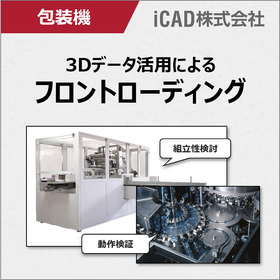
Case Presentation: Reducing Design Rework! What 3D CAD is Suitable for Packaging Machine Design?

By advancing the consideration of assembly and mechanical operations, we reduce rework! Achieving front-loading with ultra-fast response 3D CAD.

In the packaging machine industry, there is a constant demand to quickly launch new models into the market, and the design period has been getting shorter year by year. Additionally, to achieve higher performance, the structure of the machines has become more complex, and the difficulty of design has also increased. To address these challenges, it has become urgent to implement front-loading initiatives that aim to eliminate defects that are discovered in later stages as much as possible during the design phase, thereby shortening the development lead time. COLMINA Design and Manufacturing Support iCAD SX offers high-speed response capable of handling 3 million parts in 0.2 seconds, allowing for smooth design considerations without delays in processing, even for packaging machines with complex structures and a vast number of components. Furthermore, since assembly feasibility studies and operational verifications can be conducted for the entire system, it not only allows for early resolution of issues during startup but also facilitates smooth communication with customers and on-site personnel through specification discussions using 3D models, enabling efficient identification of requirements. iCAD improves design quality in packaging machine design and reduces development lead time. ◎ Customer case studies are currently available for limited viewing on the <special site>! ▶ Click on the special site to download now!   ↓↓↓

ブックマークに追加いたしました

ブックマーク一覧

ブックマークを削除いたしました

ブックマーク一覧

これ以上ブックマークできません

会員登録すると、ブックマークできる件数が増えて、ラベルをつけて整理することもできます

無料会員登録

Design and FEA Analysis Solution CAD 'SOLID EDGE'

Are you having trouble creating FEA models? Equipped with intuitive operations and a wealth of powerful editing features!

"SOLID EDGE" with Synchronous Technology is a CAD solution for design and FEA analysis that can convert CAD models into those suitable for FEA. It features the comfortable speed and flexibility of a non-history-based system while maintaining the management capabilities of a history-based system and parametric design, developed as the 3D CAD "Solid Edge." Intuitive operations that allow you to "grab and release" model shapes make editing and creating models comfortable, enabling smooth and rapid creation of innovative designs. 【Features】For FEA Modeling ■ Equipped with intuitive operations and rich, powerful editing functions ■ Allows for the creation of analysis models, including filling holes, applying fillets and chamfers, adding dimensions, flexible editing of other CAD data, creating multiple cases, and correcting problematic geometries ■ Editing that is cumbersome in history-based 3D CAD can be done extremely intuitively with Solid Edge using Synchronous Technology ■ Also capable of performing FEA simulations *For more details, please refer to the PDF materials or feel free to contact us.

ブックマークに追加いたしました

ブックマーク一覧

ブックマークを削除いたしました

ブックマーク一覧

これ以上ブックマークできません

会員登録すると、ブックマークできる件数が増えて、ラベルをつけて整理することもできます

無料会員登録

3D CAD Data Conversion 'CADPAC-NT 3D'

Supports various CAD formats such as Catia, Pro/E, Unigraphics, SOLIDWORKS, and Inventor.

It is possible to read a variety of 3D CAD data from raw data of 3D CAD software such as Catia, Pro/E, Unigraphics, SOLIDWORKS, and Inventor, and output it in other formats, including ACIS (SAT) and Parasolid kernel data, as well as intermediate file formats like IGES and STEP.

ブックマークに追加いたしました

ブックマーク一覧

ブックマークを削除いたしました

ブックマーク一覧

これ以上ブックマークできません

会員登録すると、ブックマークできる件数が増えて、ラベルをつけて整理することもできます

無料会員登録

3D Viewer for Manufacturing Processes "3DTascalX"

A 3D viewer that achieves high functionality and low cost, positioned as 'more than a viewer but less than CAD.'

High-quality data conversion capable of inputting and outputting various 3D CAD data, high-precision measurement usable for processing and inspection utilizing auxiliary coordinates, easy 2D drawing creation from 3D, and the ability to verify a wide range of secondary usable data such as design change locations, heights, slopes, holes, undercuts color-coded, projected areas, cross-sections, surface areas, and mass. By utilizing it in various manufacturing processes such as sales estimates, drawing checks, construction method considerations, data conversion, processing drawings, inspections, and assembly instructions, it promotes the effective use of your company's three-dimensional data. 【Features】 - A wide range of supported data including CATIA V4, V5, NX, Creo, SolidWorks, JT, Parasolid, IGES, STEP, ACIS, Cfio, Inventor, 3DPDF, etc. - Dedicated functionality for batch processing data conversion - High-precision measurement up to 1/10,000,000 order - Approximate circular arc interpolation for ellipses and splines - Visual verification made easier by color-coding design change locations, heights, slopes, holes, undercuts, etc. - Ability to share a lot of information with minimal licensing using a free viewer.

ブックマークに追加いたしました

ブックマーク一覧

ブックマークを削除いたしました

ブックマーク一覧

これ以上ブックマークできません

会員登録すると、ブックマークできる件数が増えて、ラベルをつけて整理することもできます

無料会員登録

3D Viewer for Manufacturing Processes "3DTascalX"

A 3D viewer that achieves high precision and multifunctionality, positioned as 'more than a viewer but less than CAD'.

High-quality data conversion capable of inputting and outputting various 3D CAD data, high-precision measurement usable for processing and inspection utilizing auxiliary coordinates, easy 2D drawing creation from 3D, and the ability to verify a wide range of secondary usable data such as design change locations, heights, slopes, holes, undercuts color-coded, projected areas, cross-sections, surface areas, and mass. By utilizing this in various manufacturing processes such as sales estimates, drawing checks, construction method considerations, data conversion, processing drawings, inspections, and assembly instructions, we can promote the effective use of our company's three-dimensional data. 【Features】 - A wide range of supported data including CATIA V4, V5, NX, Creo, SolidWorks, JT, Parasolid, IGES, STEP, ACIS, Cfio, Inventor, 3D PDF, etc. - Dedicated functionality for batch processing data conversion - High-precision measurement up to 1/10,000,000 order - Approximate circular arc interpolation for ellipses and splines - Visual verification made easy by color-coding design change locations, heights, slopes, holes, undercuts, etc. - Ability to share a lot of information with minimal licensing using a free viewer.

ブックマークに追加いたしました

ブックマーク一覧

ブックマークを削除いたしました

ブックマーク一覧

これ以上ブックマークできません

会員登録すると、ブックマークできる件数が増えて、ラベルをつけて整理することもできます

無料会員登録

Simple 3D Viewer【3DFovi】

Easy to operate even for beginners with simple usability! A 3D viewer that achieves a low price.

"3DFovi" is a 3D viewer that focuses on "simplicity," achieving overwhelming low prices and easy operation. It can display data from major 3D CAD software such as CATIAV5, NX, Creo (formerly Pro/ENGINEER), SolidWorks, as well as 2D CAD data like DXF and DWG, and allows for simple measurements. Even those who already have a 3D viewer can reduce data conversion, management workload, and running costs for 3D viewer data due to the wide variety of supported data and low pricing. 【Features】 ■ The two main features are "Viewing" and "Measuring"! ■ Capable of directly reading various data formats ■ Simple functions that anyone can easily use 【Main Functions】 "Viewing" Loading of shapes, hierarchy (assembly), colors, cross-sections, and screen splitting "Measuring" You can measure distances, angles, and diameters, and add annotations (comments) and numbering, as well as colors. Additionally, mass and external dimensions can be checked with a single command. ★ A 30-day free trial version can be downloaded from the following link: https://www.3dtascal.com/products/trial.html

  • Scientific Calculation and Simulation Software
  • others
  • CAD

ブックマークに追加いたしました

ブックマーク一覧

ブックマークを削除いたしました

ブックマーク一覧

これ以上ブックマークできません

会員登録すると、ブックマークできる件数が増えて、ラベルをつけて整理することもできます

無料会員登録

Free trial available! In any case, it's cheap! Simple 3D viewer 3DFovi.

Simple and easy to operate even for beginners! A 3D viewer that achieves an overwhelming low price of 46,200 yen.

"3DFovi" is a 3D viewer that focuses on "simplicity," achieving overwhelming low prices and easy operation. It can display major 3D CAD data such as CATIAV5, NX, Creo, SolidWorks, Inventor, as well as 2D CAD data like DXF and DWG, and allows for simple measurements. Even those who already have a 3D viewer can reduce data conversion, management labor, and running costs for 3D viewer data due to 1. the large variety of supported data and 2. the low price. 【Features】 ■ The two main functions are "View" and "Measure" ■ Directly reads various data formats ■ Simple features that anyone can easily use ■ Includes a 2D DXF and DWG viewer 【Main Functions】 "View" Loading of shapes, hierarchy (assembly), colors, cross-sections, and screen splitting "Measure" You can measure distances, angles, and diameters, and add annotations (comments) and numbering, as well as colors. Additionally, mass and external dimensions can be checked with a single command. ★ Please download the 30-day free trial version from the link below. https://www.3dtascal.com/products/trial.html

  • Scientific Calculation and Simulation Software
  • others
  • CAD

ブックマークに追加いたしました

ブックマーク一覧

ブックマークを削除いたしました

ブックマーク一覧

これ以上ブックマークできません

会員登録すると、ブックマークできる件数が増えて、ラベルをつけて整理することもできます

無料会員登録

Do you know of a 3D viewer that can be used for molding and processing plastic products?

Create drawings from 3D data with low cost and easy operation - '3DFovi' makes estimation work easier! Free interview articles from companies that have implemented it.

【Solving Such Problems!】 ☑ Efficiently create proposal-based estimates by checking for undercuts, sink marks, insufficient strength, etc. ☑ View product cross-sections and structures in detail. ☑ The sales department can also view 3D data, reducing the workload within the department. ☑ Easily present issues related to mold production and create documentation. ☑ Halve the man-hours for estimating plastic molded products. ☑ Reduce prototype lead time by 10% and improve quality, etc. Recommended for those who say, "I don't need 3D CAD..." or "I want to transition from 2D to 3D without burden..." Why not try the free trial version to see how easy it is and to improve efficiency? ★ If you are interested, please enter "Request for trial version" in the inquiry button. *Please download the interview article as a PDF.

  • Scientific Calculation and Simulation Software
  • others
  • CAD

ブックマークに追加いたしました

ブックマーク一覧

ブックマークを削除いたしました

ブックマーク一覧

これ以上ブックマークできません

会員登録すると、ブックマークできる件数が増えて、ラベルをつけて整理することもできます

無料会員登録

Achieving parallel consideration of mechanics and control! 3D CAD suitable for automotive equipment design.

Achieving front-loading in automotive equipment development, including control and robot verification! Ultra-fast response 3D CAD that smoothly handles large-scale data.

In the automotive industry, there is a demand for the rapid market introduction of new vehicles, which requires the development of automotive production equipment with short lead times and high quality. Additionally, not only mechanical design but also PLC simulation of equipment and welding robot simulation are becoming more complex, leading to efforts for pre-validation using simulators. However, general simulation software requires conversion of CAD data, which necessitates reconfiguration of mechanisms and IO information each time there is a design change. This makes it difficult to conduct parallel considerations in line with design progress, and many customers may have given up on this. To solve this issue, it is important to achieve control debugging and robot simulation directly on 3D CAD. COLMINA Design and Manufacturing Support iCAD SX can handle vast amounts of data, including operation and control information of large-scale models, with ultra-fast response times of processing 3 million parts in 0.2 seconds. It allows for control debugging and robot simulation directly on CAD. This enables an earlier start on control design, shortening the equipment development period and achieving front-loading. ▶ A special site is currently offering limited access to <case studies>!    ↓↓↓

ブックマークに追加いたしました

ブックマーク一覧

ブックマークを削除いたしました

ブックマーク一覧

これ以上ブックマークできません

会員登録すると、ブックマークできる件数が増えて、ラベルをつけて整理することもできます

無料会員登録

3D CAD/CAM system 'Mastercam' *Case study presentation

Numerous enhancements of new features that contribute to improving processing efficiency and quality. A document summarizing case studies from six companies is also being provided.

"Mastercam" is a 3D CAD/CAM system equipped with a variety of functions for design, modeling, and the creation of machining programs, as well as for the conversion, verification, and transfer of NC data, making it applicable to a wide range of machining across various industries. The latest version, "Mastercam 2023," further enhances its features. [Version Upgrade Features] ■ 3D roughing undercut detection ■ B-axis contour turning ■ Unification of "Unified" multi-axis toolpaths ■ Revamped machining group settings ■ Strengthening of "Equal Scallop" toolpaths ■ Mesh model editing ■ Enhanced 3D roughing connection operations ■ Strengthening of deburring toolpaths We are currently distributing materials summarizing case studies from six companies that have implemented "Mastercam." These are presented in an interview format, showcasing the background and effects of the implementation. [Case Study Overview] "Changes in employee awareness, improvements in production planning, increased productivity" "Reduction in machining time, decrease in the number of tools used" "Utilization in promoting DX at the site" "Replacing manual input of NC data with CAD/CAM" "Response to increasingly complex designs" *Please refer to the product materials available for download in PDF format.

ブックマークに追加いたしました

ブックマーク一覧

ブックマークを削除いたしました

ブックマーク一覧

これ以上ブックマークできません

会員登録すると、ブックマークできる件数が増えて、ラベルをつけて整理することもできます

無料会員登録